
How to Generate Posts, Excerpts, Titles and Alt Text with AI in WordPress
Writing excerpts, titles and alt text by hand is slow. AtlasAI Connector adds six AI tools straight into the WordPress editor, so you generate them without leaving the post.
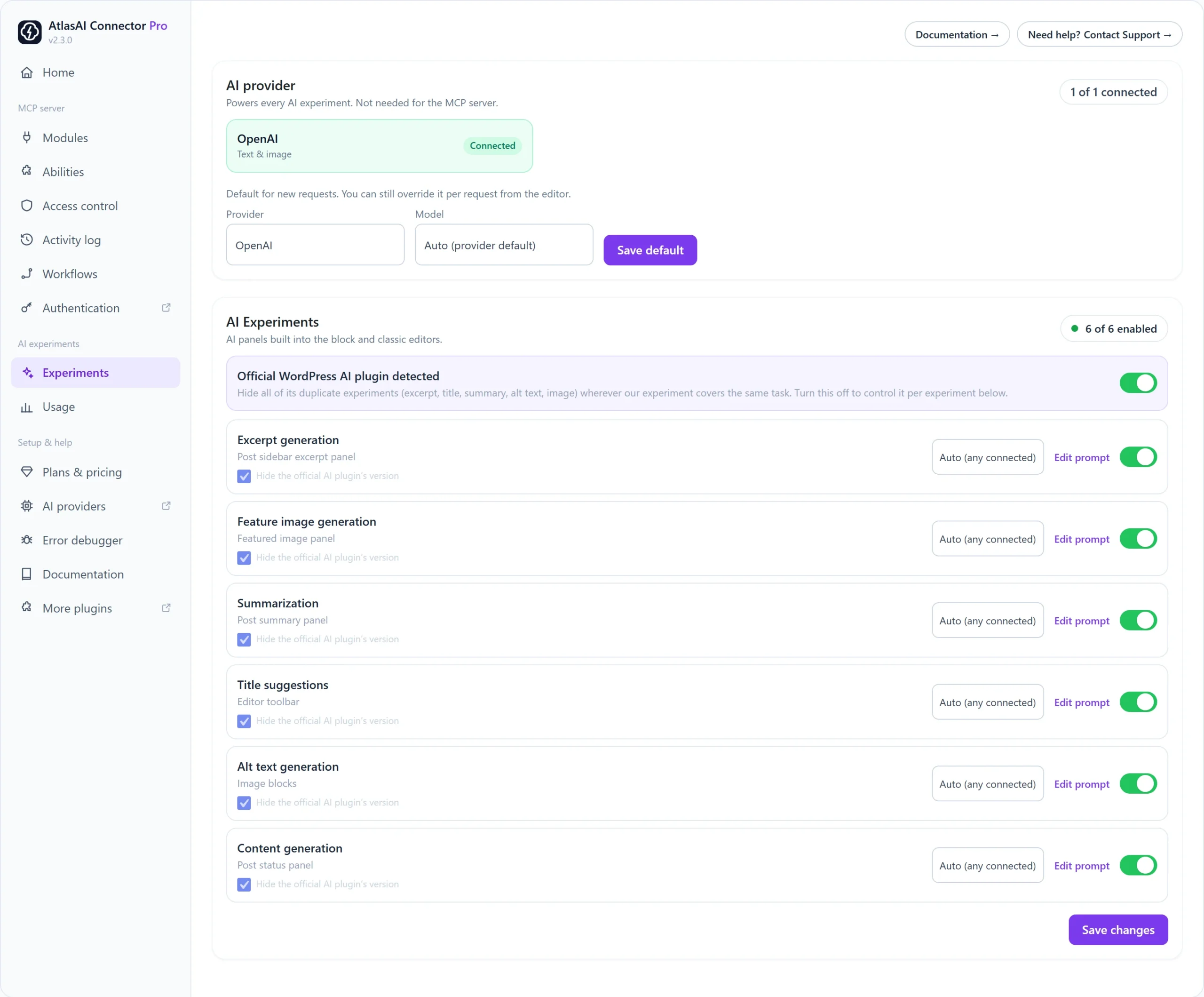
Step 1: Connect an AI provider
- Click AI providers in the AtlasAI Connector menu and add a key for OpenAI, Google or Anthropic.
- Go to AtlasAI Connector → Experiments. The provider shows Connected.
- Choose a default Provider and Model, or keep Auto, and click Save default.
Step 2: Choose your AI tools
| Experiment | Where you find it |
|---|---|
| Content generation | Post status panel (Classic Editor: the AtlasAI Write button beside Add Media) |
| Excerpt generation | Excerpt panel in the post sidebar |
| Feature image generation | Featured image panel |
| Summarization | Post summary panel |
| Title suggestions | Editor toolbar |
| Alt text generation | Image blocks and the media library |
Switch each one on or off, choose a provider per experiment if you like, and click Edit prompt to change the wording the AI receives. Click Save changes.
Step 3: Use them in a post
- Open a post or page.
- For a full draft, open content generation, enter a topic, pick a title, edit the outline, then generate and review the draft before it is inserted.
- Use the excerpt, title, summary and image panels the same way: generate, review, then apply.
Using the official WordPress AI plugin too?
If the official WordPress AI plugin is active, keep Official WordPress AI plugin detected switched on to hide its duplicate tools where AtlasAI Connector already covers the task.
Pro: Prompt templates, batch mode for several versions at once, an explanation of each generation, generation history and keyboard shortcuts.