
How to Build Reusable AI Workflows in WordPress
Some jobs need several steps, for example analyze a post, suggest keywords and write an excerpt. A workflow saves those abilities and a prompt together, so you run the whole job in one go.
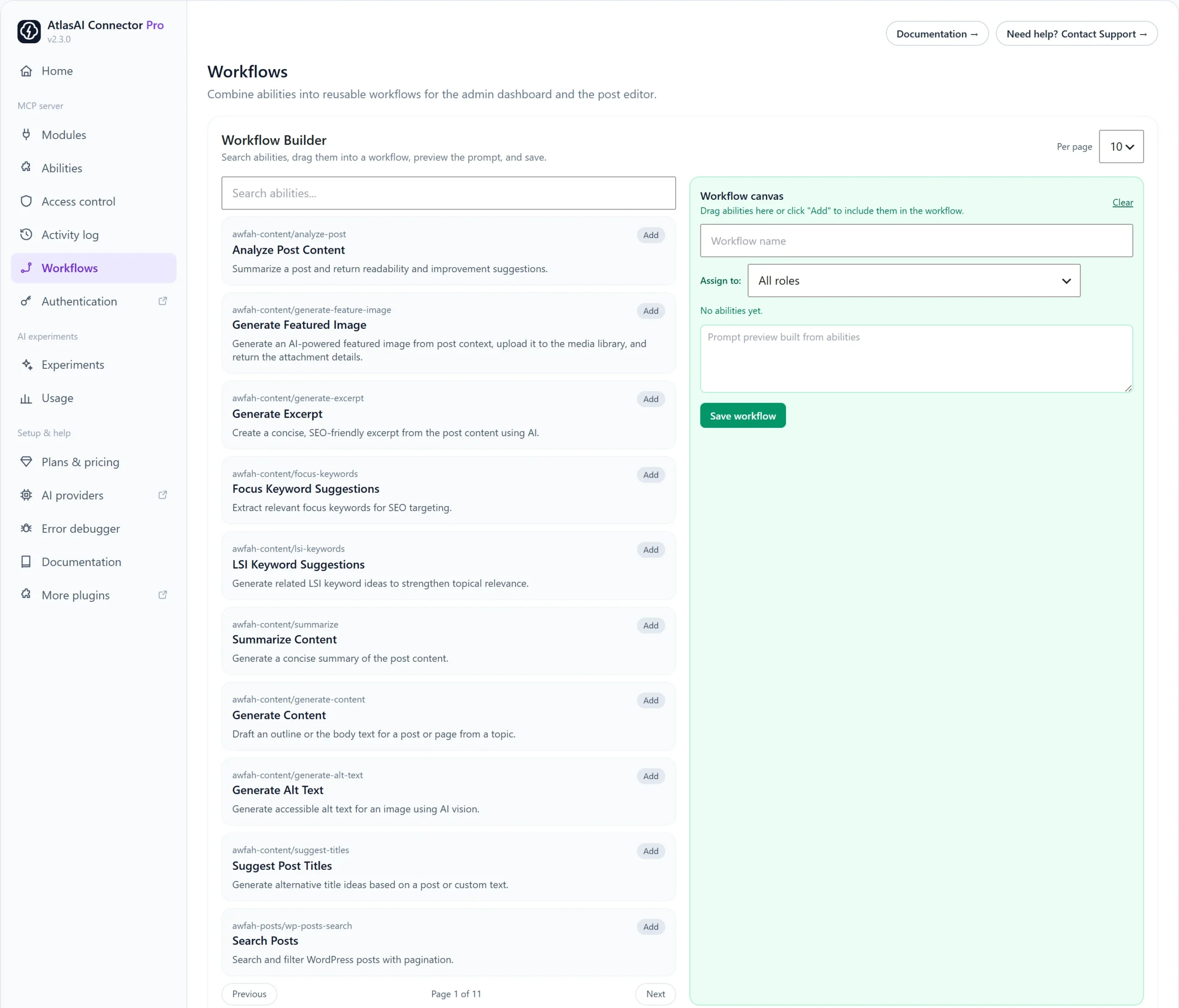
How to create a workflow
- Go to AtlasAI Connector → Workflows.
- Search for an ability and click Add, or drag it onto the Workflow canvas.
- Add the other abilities in the order you want them to run.
- Enter a Workflow name.
- Choose a role under Assign to, or keep All roles.
- Check the prompt preview and edit it if needed.
- Click Save workflow.
Saved workflows appear under Saved workflows, where you can edit or delete them.
Example workflows
- Publish prep: Analyze Post Content, Focus Keyword Suggestions, Generate Excerpt.
- Image pass: Generate Featured Image, Generate Alt Text.
- Content refresh: Search Posts, Summarize Content, Suggest Post Titles.
Limits and Pro
The free plugin saves up to 3 workflows.
Pro: Unlimited workflows, plus 6 ready-made workflow prompts your MCP client can use: SEO Audit, Content Brief, Publish-Ready Check, Site Overview, Content Inventory and Store Dashboard.