
Text to Speech Pro —
Lifelike Audio for WordPress
AtlasVoice Text to Speech Pro is the most complete WordPress text to speech plugin. Add natural AI-powered audio narration to every page and post. 4 voice providers, 81+ languages, read-along highlighting, MP3 downloads, analytics and SEO-optimized audio schema — all from your WordPress dashboard.
or download the free version from WordPress.org
What Your Licence Covers — and What It Doesn’t
Four voice providers, one of them included outright. We would rather tell you this before you buy than after.
| Voice provider | Cost | What you need |
|---|---|---|
| AtlasVoice TTS Pro | Included with Pro | Nothing. Activate Pro and generate audio in 81 languages — no third-party account, no API key, no usage fees ever. |
| Google Cloud TTS | Billed by Google | Your own Google Cloud account and API key. Google charges you directly for what you generate. The integration is included; the usage is not. |
| ChatGPT TTS (OpenAI) | Billed by OpenAI | Your own OpenAI account and API key. OpenAI charges you directly for what you generate. |
| ElevenLabs TTS | Billed by ElevenLabs | Your own ElevenLabs account and API key. ElevenLabs charges you directly for character usage, which the plugin tracks live in your dashboard. |
In plain terms: your Pro licence includes the AtlasVoice TTS Pro engine with no usage fees at all. Google, OpenAI and ElevenLabs are optional upgrades — you connect your own account and they bill you directly for what you use. Plenty of sites run on AtlasVoice TTS Pro alone and never pay a third party a cent.
Listen Before You Buy
Pick a player, pick a voice, press play. This is the real plugin running on this page — not a recording. Compare every provider on the same text and hear the difference for yourself.
1 · Choose a player
2 · Listening
Live preview ·
Powered by AtlasVoice Pro — add this to any WordPress site with the [atlasvoice] shortcode or automatically on every post.
Prefer a full page? Open the complete Pro demo, or try the free version demo on WordPress.org.
Everything You Need for Professional Audio on WordPress
Twelve Pro capabilities in four groups. Step through them at your own pace.
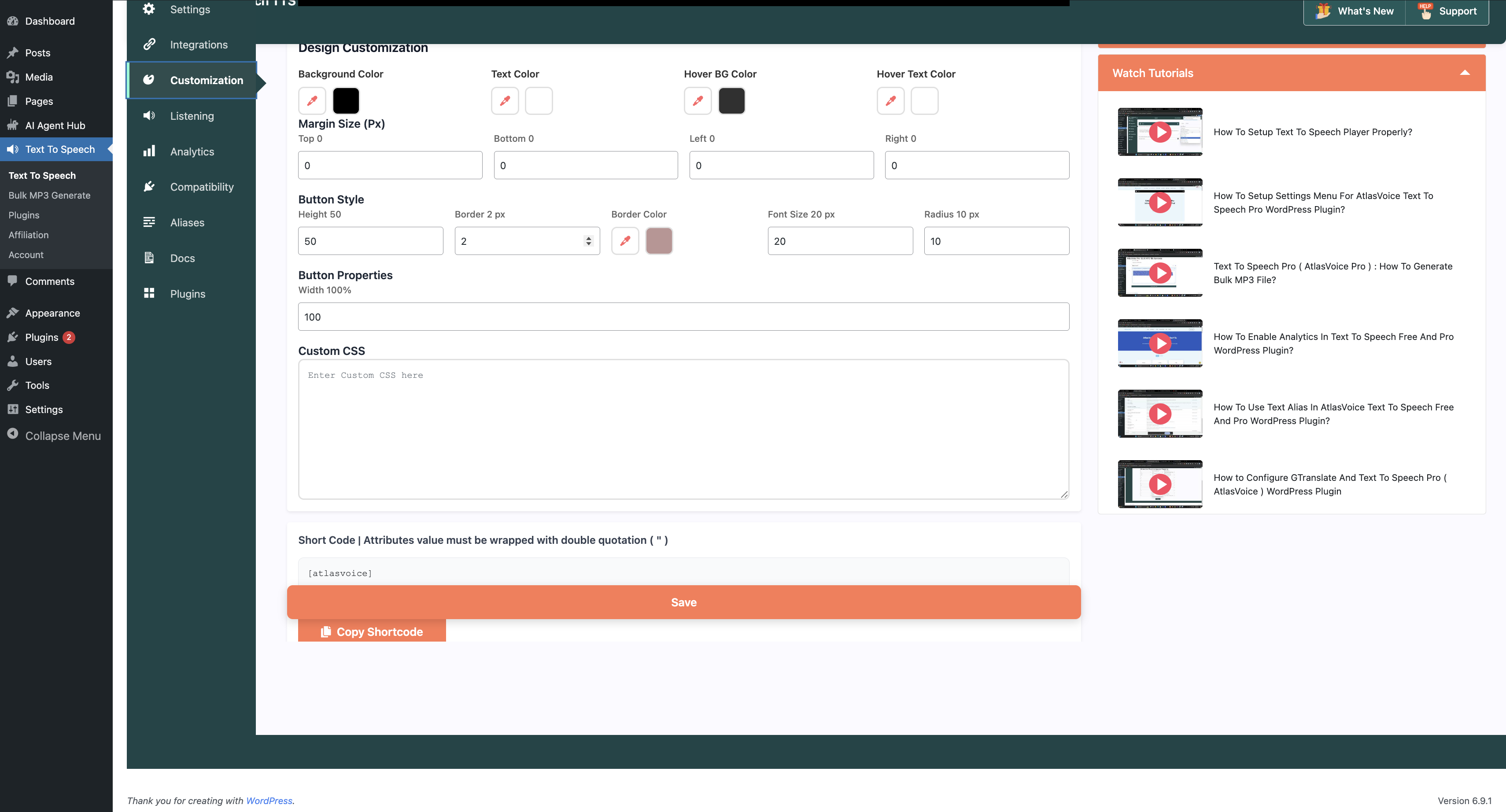
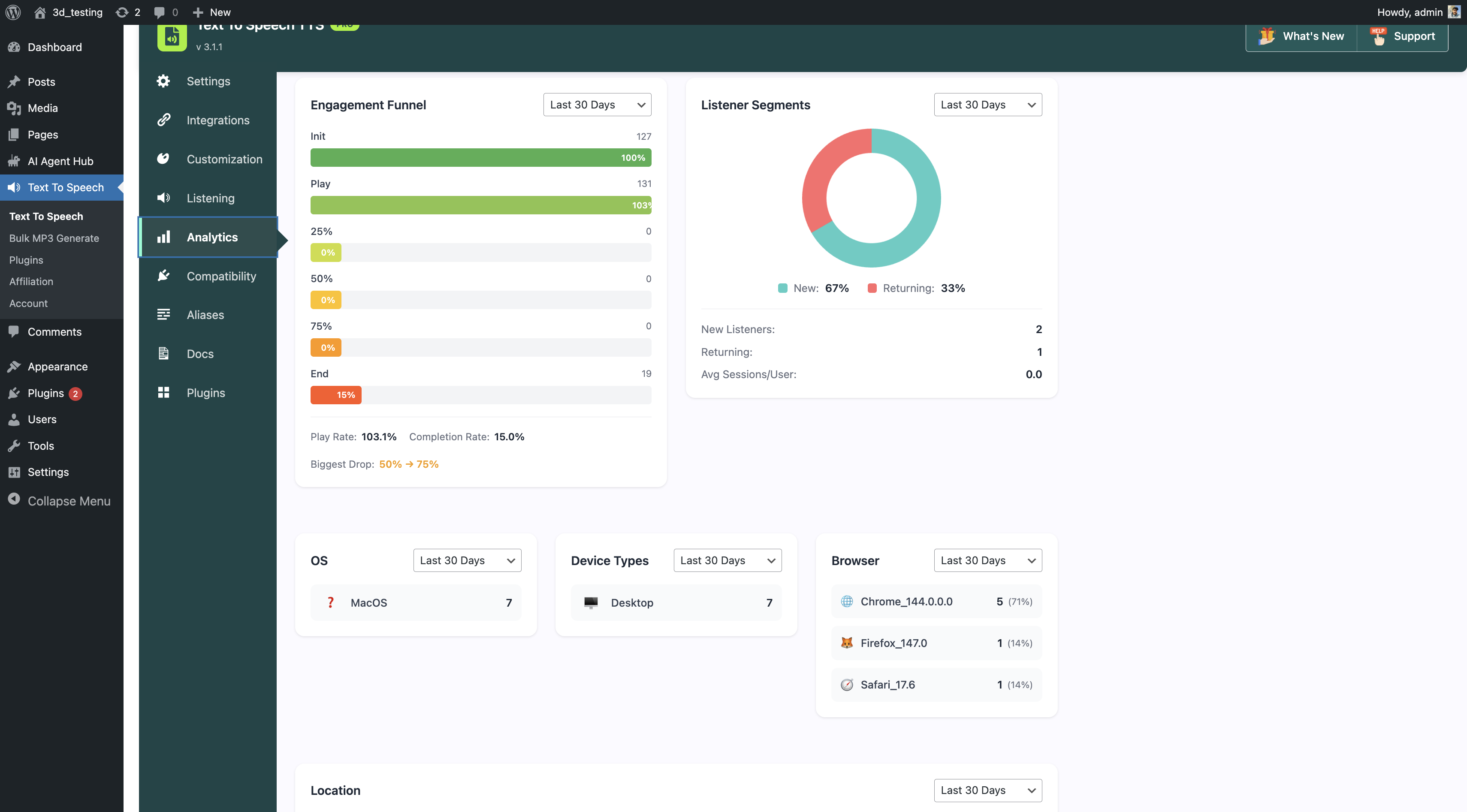
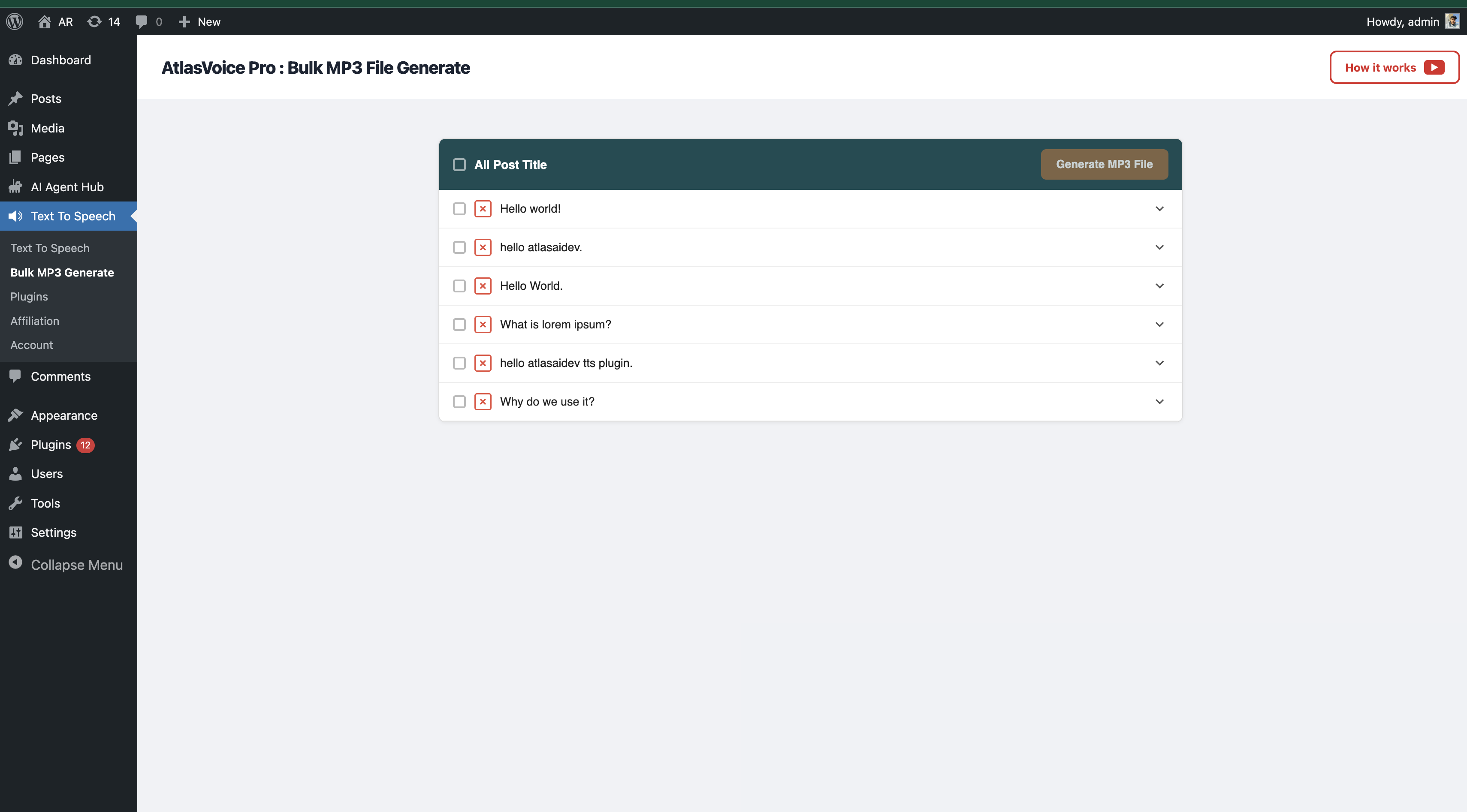
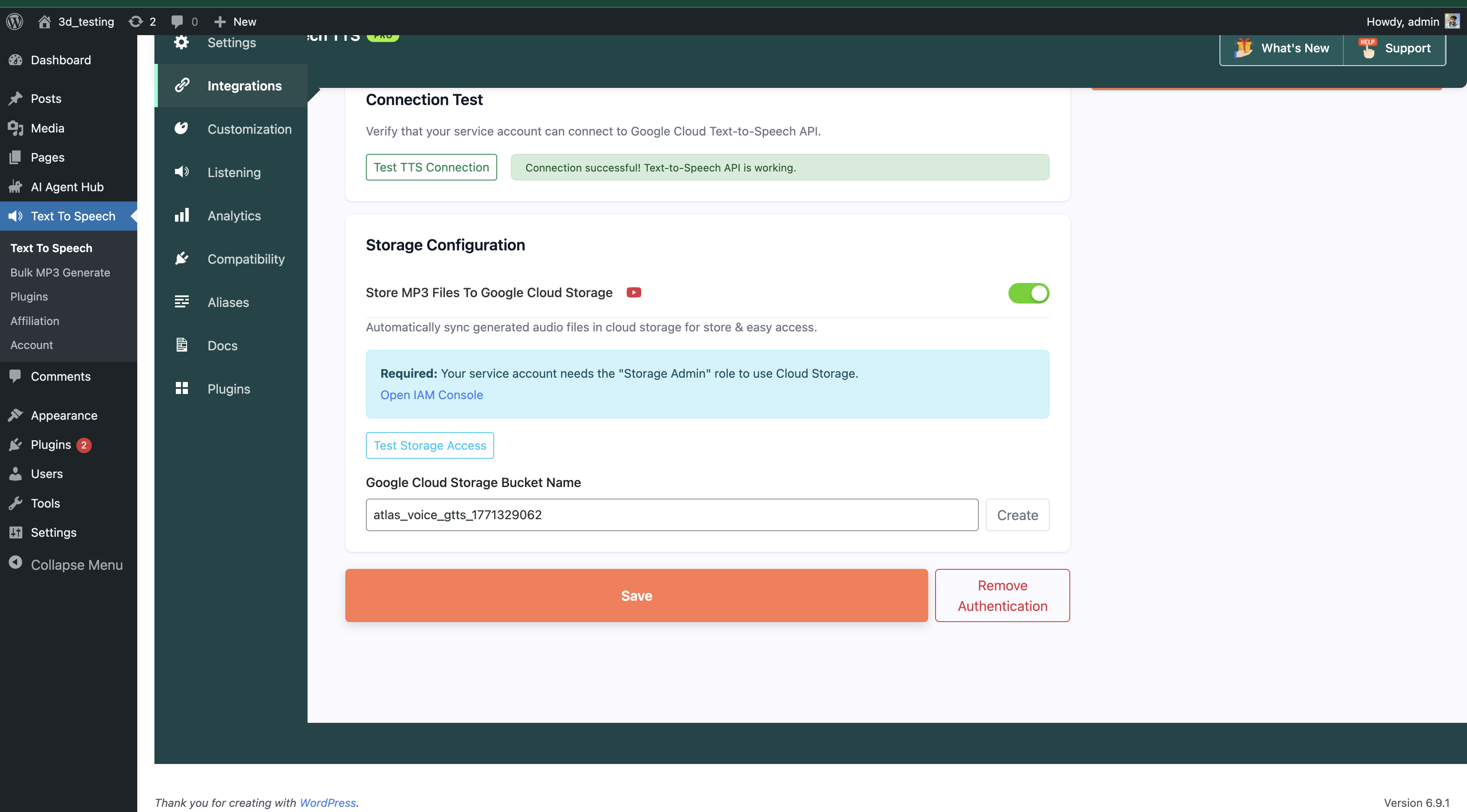
Inside the Dashboard
Nine screens, all inside WordPress. No external console, no separate login. Step through them below.
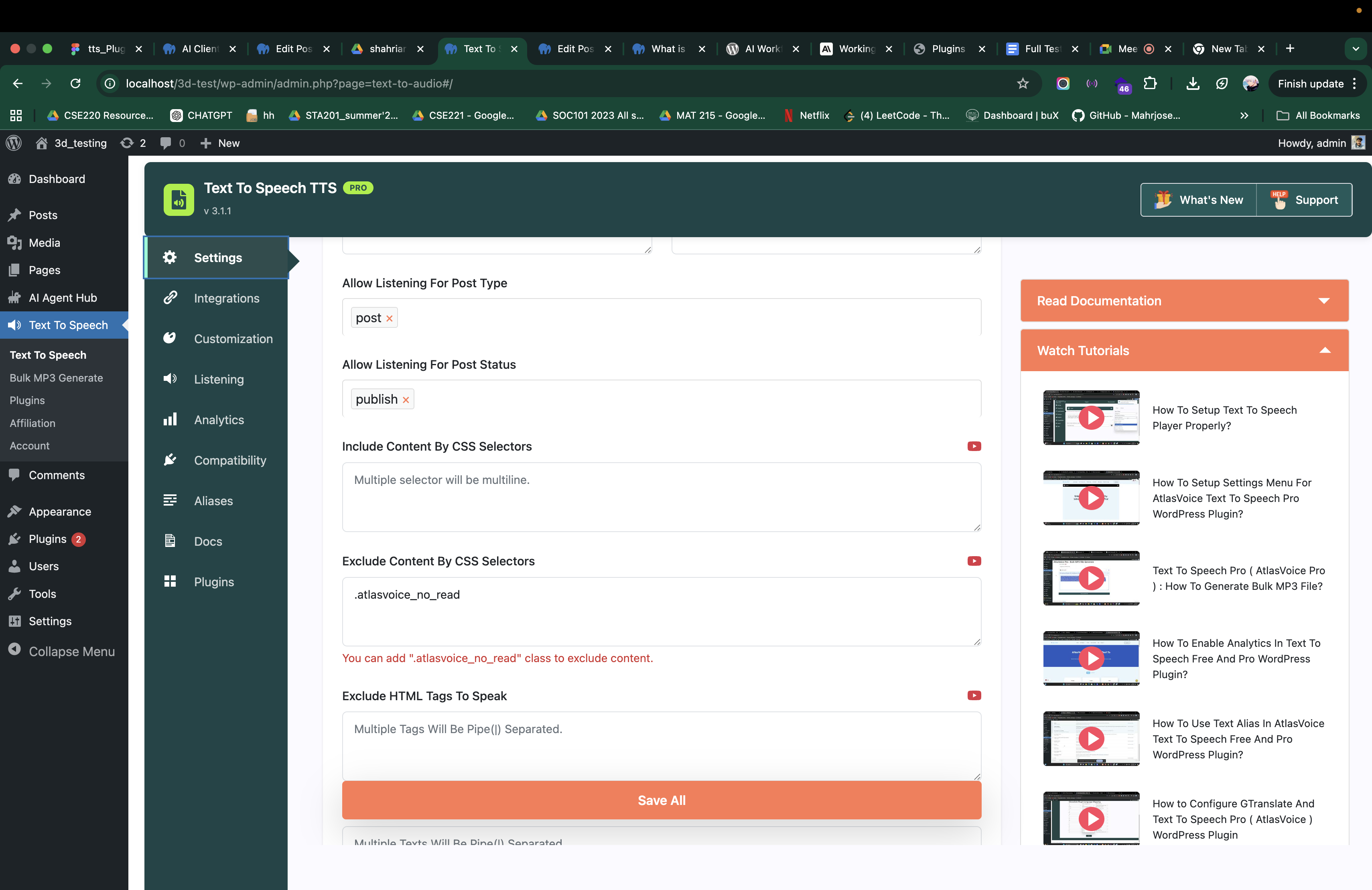
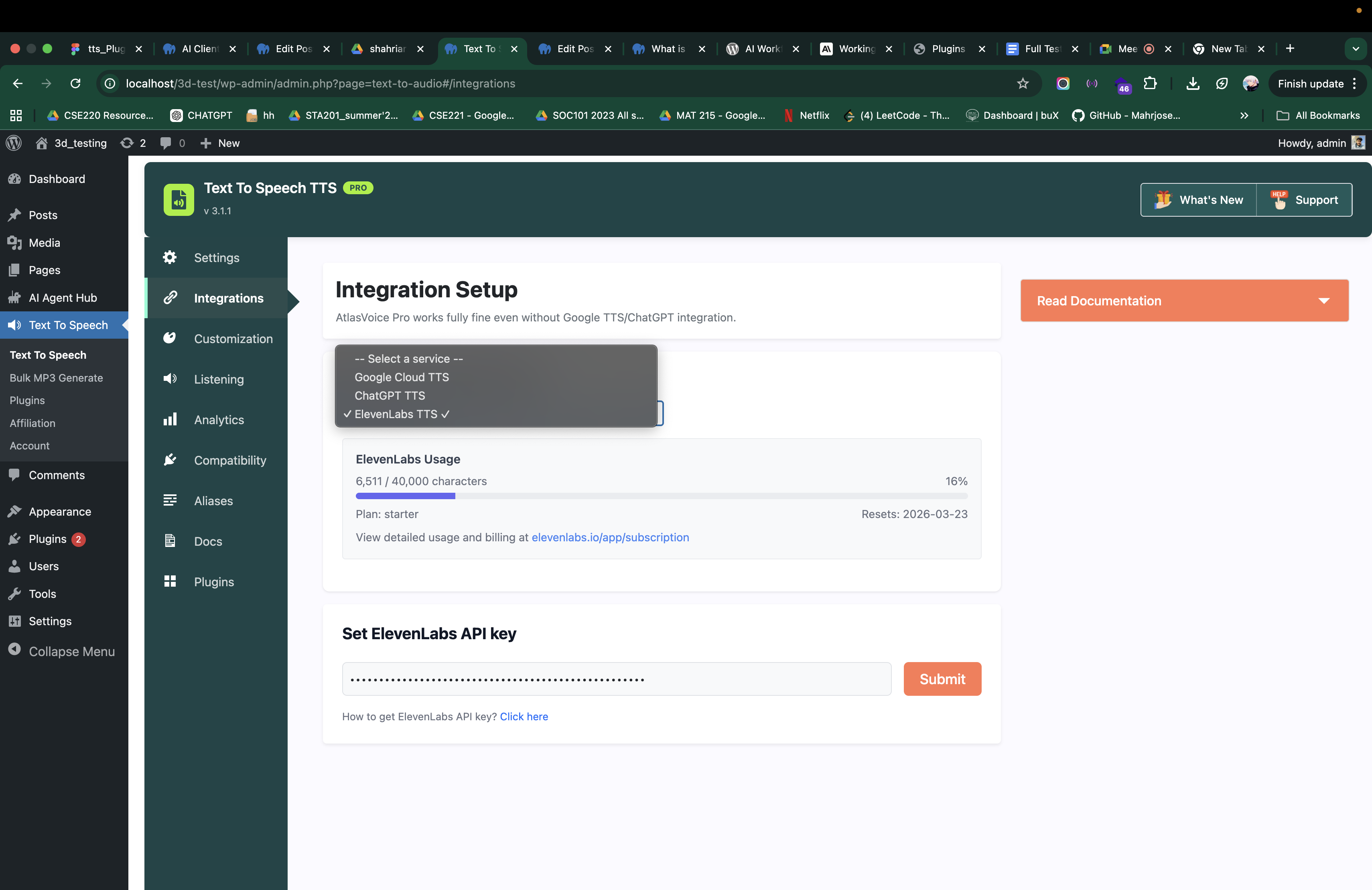
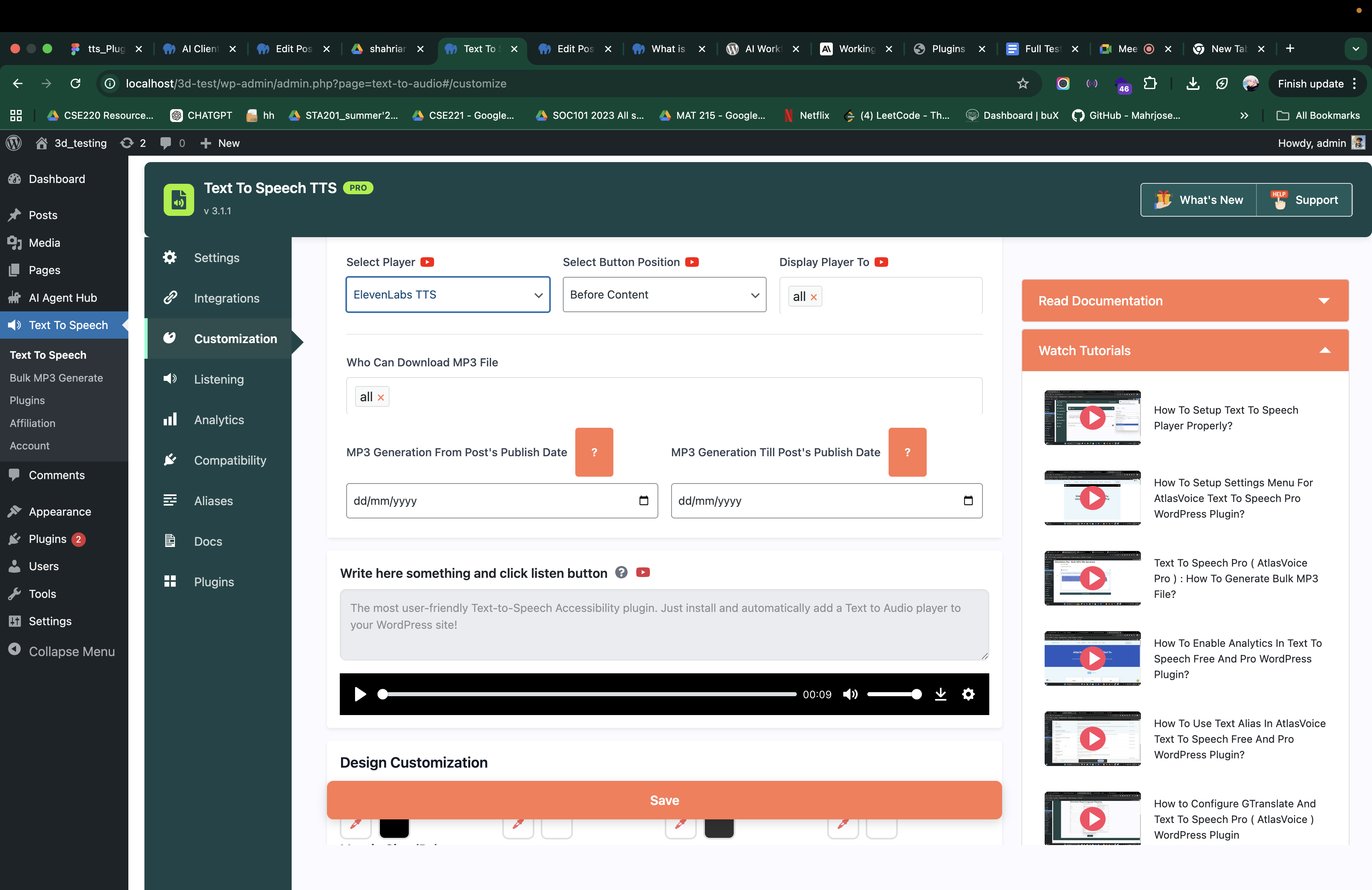
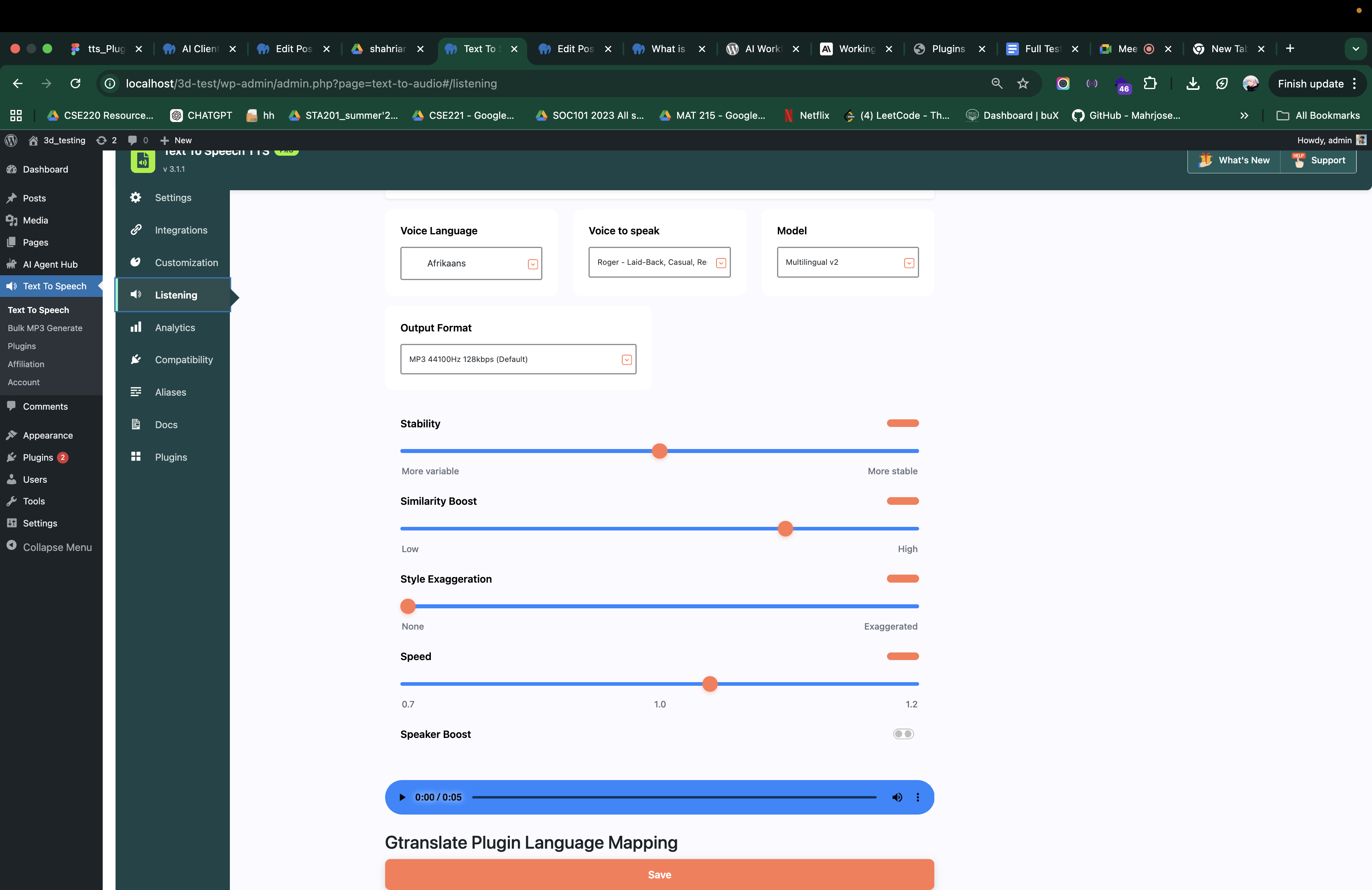
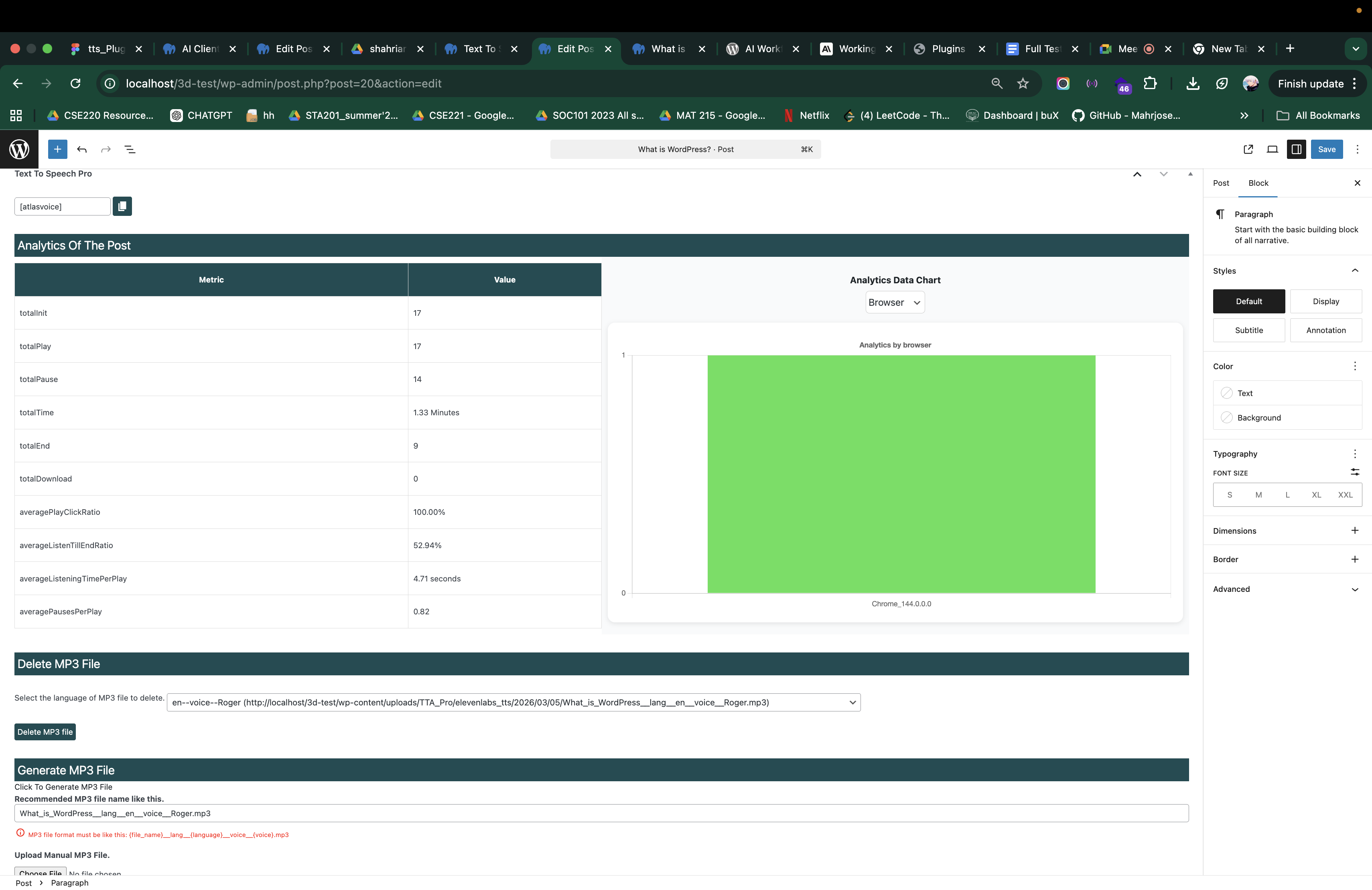
Up and Running in 3 Simple Steps
Add professional AI audio narration to your WordPress site in under 5 minutes.
Install & Activate
Install the free AtlasVoice plugin from WordPress.org, then upload and activate the Pro add-on from your dashboard. No coding needed.
Choose Your Voice
Start with AtlasVoice TTS Pro straight away — it is included. Or connect Google Cloud, OpenAI or ElevenLabs with your own account from the Integration menu.
Publish & Listen
A player appears automatically on your posts and pages. Visitors press play and hear your content read aloud, with the text highlighting as it goes.
Free vs Pro Comparison
The four bold rows are the ones that decide it for most people.
| Feature | Free | Pro |
|---|---|---|
| Voices & Languages | ||
| Browser-Based Voices (Web Speech API) | ✓ | ✓ |
| AtlasVoice TTS Pro Voices (81 Languages, included) | ✗ | ✓ |
| Google Cloud TTS (300+ Voices, 90+ Langs) — billed by Google | ✗ | ✓ |
| OpenAI / ChatGPT TTS (6 HD Voices) — billed by OpenAI | ✗ | ✓ |
| ElevenLabs (100+ Voices) — billed by ElevenLabs | ✗ | ✓ |
| WPML / GTranslate / TranslatePress / Polylang | ✗ | ✓ |
| Read-Along & Player | ||
| Sentence Read-Along Highlighting | ✓ | ✓ |
| Word-Perfect Highlighting (Google & ElevenLabs) | ✗ | ✓ |
| Basic Audio Player | ✓ | ✓ |
| 6 Player Styles + Floating Player | ✗ | ✓ |
| MP3 Generation & Bulk Export | ✗ | ✓ |
| Visitor MP3 Downloads | ✗ | ✓ |
| Google Cloud Storage MP3 Backup | ✗ | ✓ |
| Content Control | ||
| Gutenberg Block & Shortcode | ✓ | ✓ |
| Post Type Selection | ✓ | ✓ |
| CSS Selector Targeting | ✗ | ✓ |
| Exclude Text, Tags, Posts & Categories | ✗ | ✓ |
| Unlimited Text Alias | ✗ | ✓ |
| Read Content From DOM | ✗ | ✓ |
| Audio Intros & Outros | ✗ | ✓ |
| Analytics, SEO & Support | ||
| Advanced Analytics & Heatmaps | ✗ | ✓ |
| Audio Schema (SEO Rich Results) | ✗ | ✓ |
| 50+ Filters & REST API (tta_pro/v1) | ✗ | ✓ |
| Priority Support | ✗ | ✓ |
Trusted by 4,000+ WordPress Sites
Every quote below is a verified review on WordPress.org.
“My customers especially appreciate the read-aloud feature, and they have been even more impressed with the recently added text-highlighting feature that follows along as the text is read. These tools make reading more engaging and accessible.”

“We chose this plugin as it has great features and integrates well with lots of TTS providers. The pro version is priced very reasonably. I had a few questions during setup, and the team were quick to respond, friendly and very helpful. Recommend very highly.”

“I’m a researcher — not really skilled at managing website content. I couldn’t figure out how to exclude the TTS button from the home page. I emailed support, and to my pleasant surprise, I received a clear solution the very same day. I’m truly impressed by both the product and the outstanding customer support.”

“The support I received was far above the quality I expected. The representative was professional, very knowledgeable, and worked diligently to solve my issues. He worked longer and harder than any other plugin service provider I have ever experienced.”

“I have been using this product for some time and a bug popped up. I contacted customer support, their response was prompt, and they had the issue solved in less than 24 hours.”

“Simple and intuitive setup. I started working on the website without any problems. This plugin is a godsend — a great tool for expanding the site’s capabilities. I recommend this plugin to all users!”

Read all 91 reviews on WordPress.org — rated 4.8 out of 5.
Choose Your Plan
Every plan includes the AtlasVoice TTS Pro voice engine with no usage fees.
Starter
- AtlasVoice TTS Pro engine included
- All 4 voice providers supported
- MP3 generation & downloads
- Read-along highlighting
- 6 player styles + floating player
- Audio schema for SEO
- Lifetime updates & 1 year priority support
Professional
- Everything in Starter
- 5 site activations
- Advanced analytics & heatmaps
- Google Cloud Storage backup
- Priority email support
- Agency-friendly & multisite ready
- Lifetime updates & 1 year priority support
Enterprise
- Everything in Professional
- 10 site activations
- Bulk MP3 generation at scale
- White-label ready
- Priority email support
- Multisite compatible
- Lifetime updates & 1 year priority support
Secure checkout powered by Freemius. All plans are purchased from our pricing page.
Frequently Asked Questions
Ready to Give Your Content a Voice?
Join 4,000+ WordPress sites using AtlasVoice to make their content more accessible, engaging and SEO-friendly.